Dump Reader is designed for DBAs, recovery engineers, auditors, and support teams that need to
inspect Oracle dump files before committing to a full restore. It treats an export file as a
read-only data source: no Oracle client, no imp or impdp job, and no
modification to the source dump file.
Why direct dump access matters
The normal way to check an Oracle export is to prepare a compatible Oracle environment, create a temporary database or schema, run an import, and then query the imported objects. That workflow is reliable when the final goal is a full rebuild, but it is heavy when the first question is basic: is the table present, are rows readable, and can the data be exported now?
- The workstation may not have Oracle installed.
- The dump may need an offline pre-check before it is moved into a recovery environment.
- The task may be selective extraction, not a full schema recreation.
- Version, character set, tablespace, and permission issues can slow down a simple verification job.
DBRECOVER for Oracle addresses that pre-check stage. Open the dump, inspect schemas and tables, preview rows, run read-only SQL, export CSV or BLOB data, and then decide whether a full Oracle import is still required.
Support at a glance
| Capability | Traditional exp |
Data Pump expdp |
|---|---|---|
| Automatic format detection | Supported | Supported |
| Table and column metadata | Reads CREATE TABLE and column descriptors |
Reads XML metadata for table and column definitions |
| Row data | Parses INSERT row streams |
Parses supported Data Pump table data streams |
| LOB data | CLOB and BLOB supported | CLOB and BLOB supported, including known multi-piece appendages |
| KGC/Data Pump compression | Not applicable | Supported for current KGC/HDR type-1 metadata and table data streams |
| Local SQL cache | SQLite-backed read-only query | SQLite-backed read-only query |
| CSV and BLOB export | Supported | Supported |
| Diagnostic evidence report | Supported | Supported, including Data Pump header, stream map, and KGC evidence |
| Encrypted dump files | Not supported | Not supported |
Core capabilities
Read EXP and EXPDP
Detect traditional exp files and Data Pump expdp files automatically, then list readable schemas and tables.
Extract table rows
Read supported row streams directly from the dump and preview table content without creating an Oracle database.
Handle LOB data
Read CLOB and BLOB values, view CLOB content, and save BLOB values as independent files when extraction is needed.
Read supported KGC streams
Recognize Oracle Data Pump KGC/HDR compression and decode the currently supported type-1 metadata and table data streams.
Query locally
Build a local SQLite cache so repeated previews and read-only SQL queries are faster and easier to reproduce.
Report evidence
Produce parse reports that identify headers, stream descriptors, signatures, KGC evidence, and failure reasons.
How parsing works
When Dump Reader opens a file, it first attempts the traditional exp parser. If readable
table structure and data are found, the file is classified as a traditional export. If not, Dump
Reader moves to the expdp parser and scans for Data Pump descriptors, XML metadata,
table data streams, and KGC/HDR evidence.
A parse report is generated either way. That matters in real support cases: if the tool sees Data Pump headers or KGC streams but cannot build a table catalog, the report can distinguish an unknown stream variant from a file that simply does not look like an Oracle dump.
Traditional EXP support
For older Oracle exp style dumps, Dump Reader scans SQL-style export content in chunks
instead of loading the full dump into memory. It detects schemas through CONNECT
statements, reads CREATE TABLE definitions, parses INSERT row content,
and maps column descriptors into readable table metadata.
Traditional export LOB handling includes short LOB values, long LOB pieces, NULL LOB markers, and
LOB read error markers. CLOB data is decoded using available character set information. BLOB data can
be stored in the local query cache and exported as standalone .blob files.
Data Pump EXPDP support
Data Pump files are not plain SQL scripts. Dump Reader works with the internal descriptor layout,
XML metadata, and table data streams used by expdp. The parser reads available header
evidence such as version, database version, job name, platform, character set, and block size, then
maps metadata and data ranges into a stream report.
For table data, the current implementation supports known regular row and long row encodings,
including row types 0x3C, 0x1C, 0x0C, and 0x08.
It also resynchronizes after abnormal candidate rows so one bad segment does not automatically end
the whole read attempt. Data Pump master/internal tables can be identified and skipped during batch
export when they are not relevant to the user's data extraction task.
KGC/Data Pump compression
Some Data Pump files contain Oracle internal KGC/HDR compressed streams. This is not zip, gzip,
zlib, or raw deflate. Dump Reader recognizes KGC...HDR blocks, supports the current
KGC type-1 metadata block format, supports type-1 compressed table data streams, handles the KGC
END marker, and protects extraction with a maximum block size limit.
If a file contains an unknown KGC type or an unsupported stream variant, Dump Reader still records the evidence in the diagnostic report. That makes the limitation explicit instead of reducing the result to a vague "not a dump file" message.
SQL query without Oracle
Dump Reader builds a local SQLite cache next to the dump file using the .dbrcache
extension. The cache stores a manifest with the source file size and modification time, so it can be
rebuilt automatically when the dump changes. Oracle schemas are isolated through attached SQLite
databases, and data is loaded lazily when a table preview or query requires it.
The query layer is read-only. Statements such as INSERT, UPDATE,
DELETE, DROP, ALTER, and CREATE are blocked.
The default query result limit is 5,000 rows, and common Oracle-style functions such as
NVL, NVL2, DECODE, SYSDATE,
SYSTIMESTAMP, TO_CHAR, and TO_DATE are available for
practical inspection queries.
After opening a dump file and selecting a table, you can type SQL into the SQL Query panel. For example, this query groups object rows by type:
select object_type, count(*) from tv group by object_type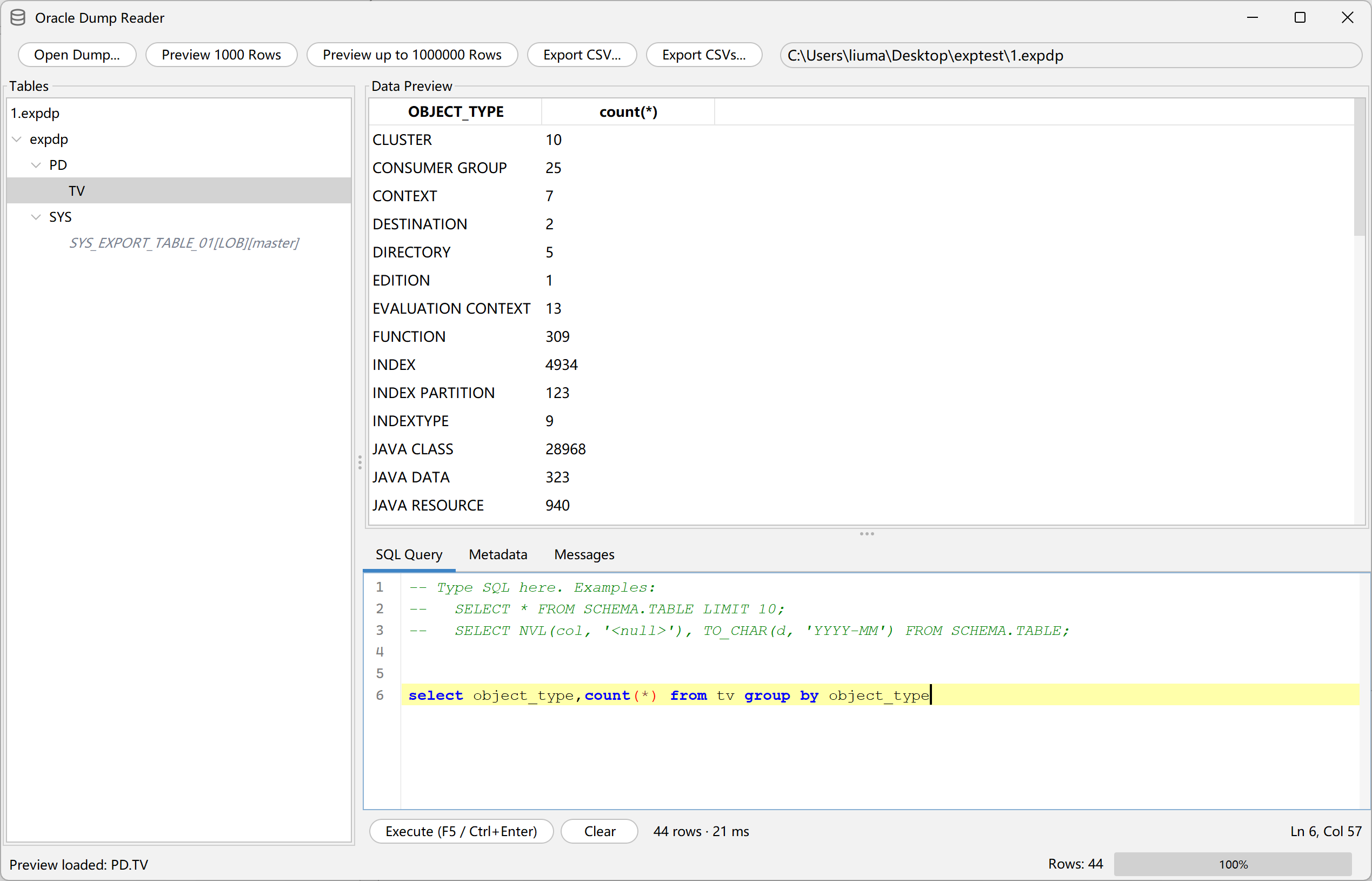
GUI and export workflow
-
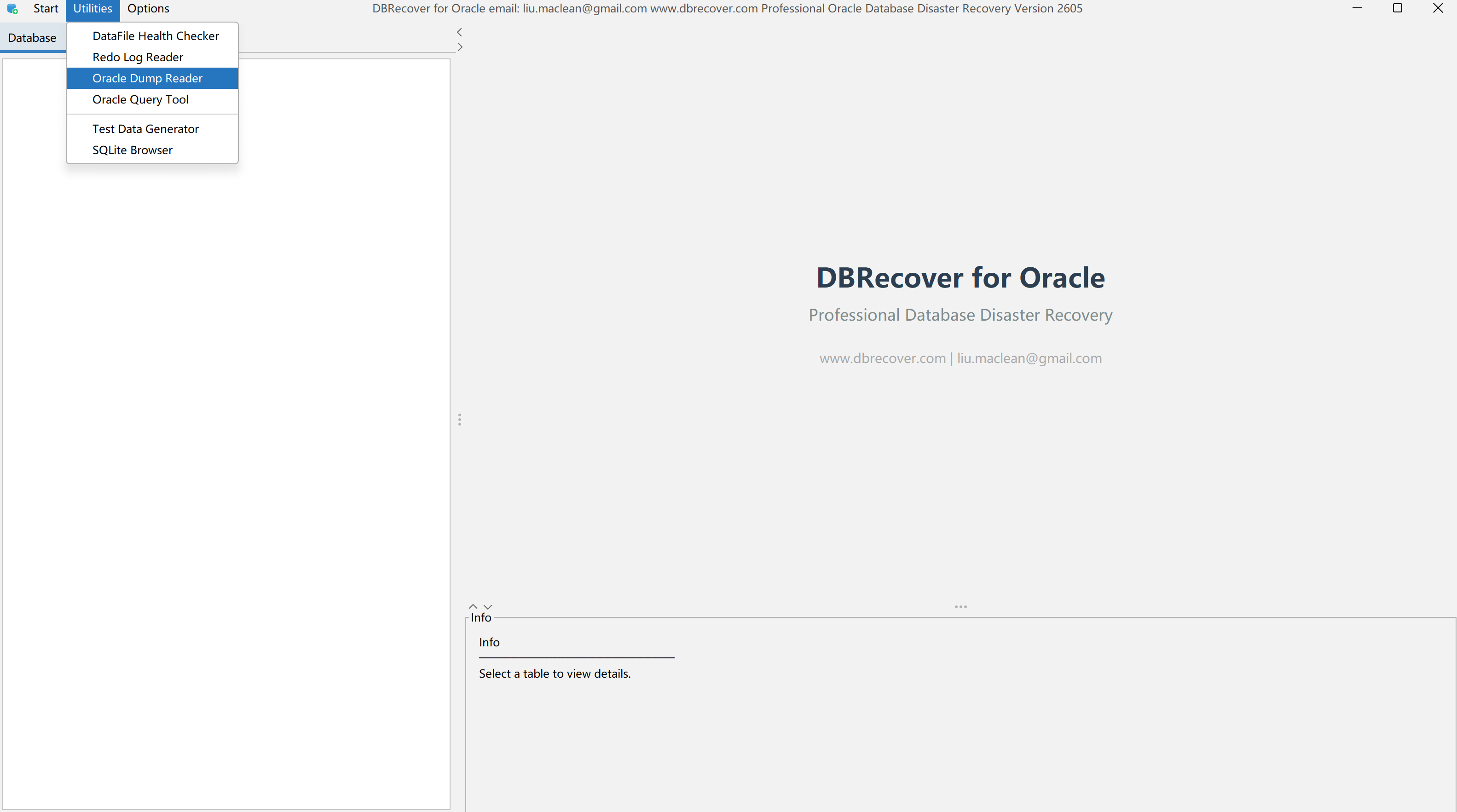
Open the feature.
In the DBRECOVER for Oracle main window, open
Utilitiesand chooseOracle Dump Reader. -
Select a dump file.
Click
Open Dump...and choose an EXP or EXPDP dump file. The tool reads the structure and lists schemas and tables. -
Preview the target table.
Click
Preview 1000 RowsorPreview up to 1000000 Rowsto check whether the data is readable. -
Run SQL.
Use the
SQL Querytab to run a query and review the result in the preview grid. -
Export CSV and BLOB data.
Use
Export CSV...for the current result orExport CSVs...for batch export. When BLOB columns are present, choose a BLOB output directory to extract binary payloads.
CSV output uses UTF-8 with BOM and handles commas, double quotes, line feeds, and carriage returns. The GUI also marks tables that contain LOB data, identifies Data Pump master/internal tables, allows CLOB viewing, and can generate an HTML export report with success, failure, skip, row count, and BLOB statistics.
Data type coverage
Dump Reader currently maps common Oracle scalar and LOB types, including VARCHAR, NUMBER, LONG, DATE,
RAW, LONG RAW, CHAR, BINARY_FLOAT, BINARY_DOUBLE, CLOB, BLOB, TIMESTAMP, TIMESTAMP WITH TIME ZONE,
TIMESTAMP WITH LOCAL TIME ZONE, and common INTERVAL types. Unknown Oracle type numbers are preserved
as UNKNOWN(n); they are reported rather than silently treated as fully supported native
Oracle types.
Where this helps
- No local Oracle environment: inspect dump contents on a workstation without installing Oracle.
- Emergency validation: confirm that a dump contains key business tables or records before planning a restore.
- Offline review: sample rows, inspect columns, and inventory objects from archived dump files.
- Cross-team delivery: convert selected dump data into CSV for teams that do not use Oracle tools.
- Support diagnostics: collect Data Pump header, stream map, and KGC evidence before deeper engineering review.
- Local processing: read dump files locally without uploading production data to an external service.
Known limits
Dump Reader is intentionally focused on table, column, row, LOB, query, export, and diagnostics workflows. It is not a full replacement for Oracle import or a complete Data Pump implementation.
- Encrypted Data Pump dumps are not supported.
- Unsupported Oracle versions, unknown Data Pump compression variants, and unknown KGC types may be detected but not decoded.
- gzip, zlib, and raw deflate are not treated as Oracle Data Pump internal compression.
- Complex object families such as ADT, nested table, VARRAY, XMLType, BFILE, and external table are not promised as complete round-trip support.
- The SQL layer is SQLite-compatible SQL with selected Oracle helper functions, not a full Oracle SQL engine.
- Dump Reader does not execute Oracle import and does not generate a new dump that can be directly loaded by
impdp. - Multi-file Data Pump dump set stitching is not a currently promised capability.
These boundaries are practical. They keep the feature honest for production use: when Dump Reader can read the dump, it gives immediate access to data; when it cannot, it produces evidence that helps a DBA or support engineer understand what kind of file or stream variant they are dealing with.
Download version 2605
The Oracle Dump Reader is available starting with DBRECOVER for Oracle 2605. Download it from the DBRECOVER for Oracle product page or directly download the 260715 beta package.
Dump browsing, SQL query, and CSV export are processed locally by DBRECOVER. Production dump files do not need to be uploaded unless a separate secure support workflow explicitly requires it.